The Complete SecureNow Workflow: From First Trace to Incident Resolution
A comprehensive walkthrough of the entire SecureNow platform — from application setup and trace ingestion through alert rules, AI investigation, forensic analysis, and incident resolution.

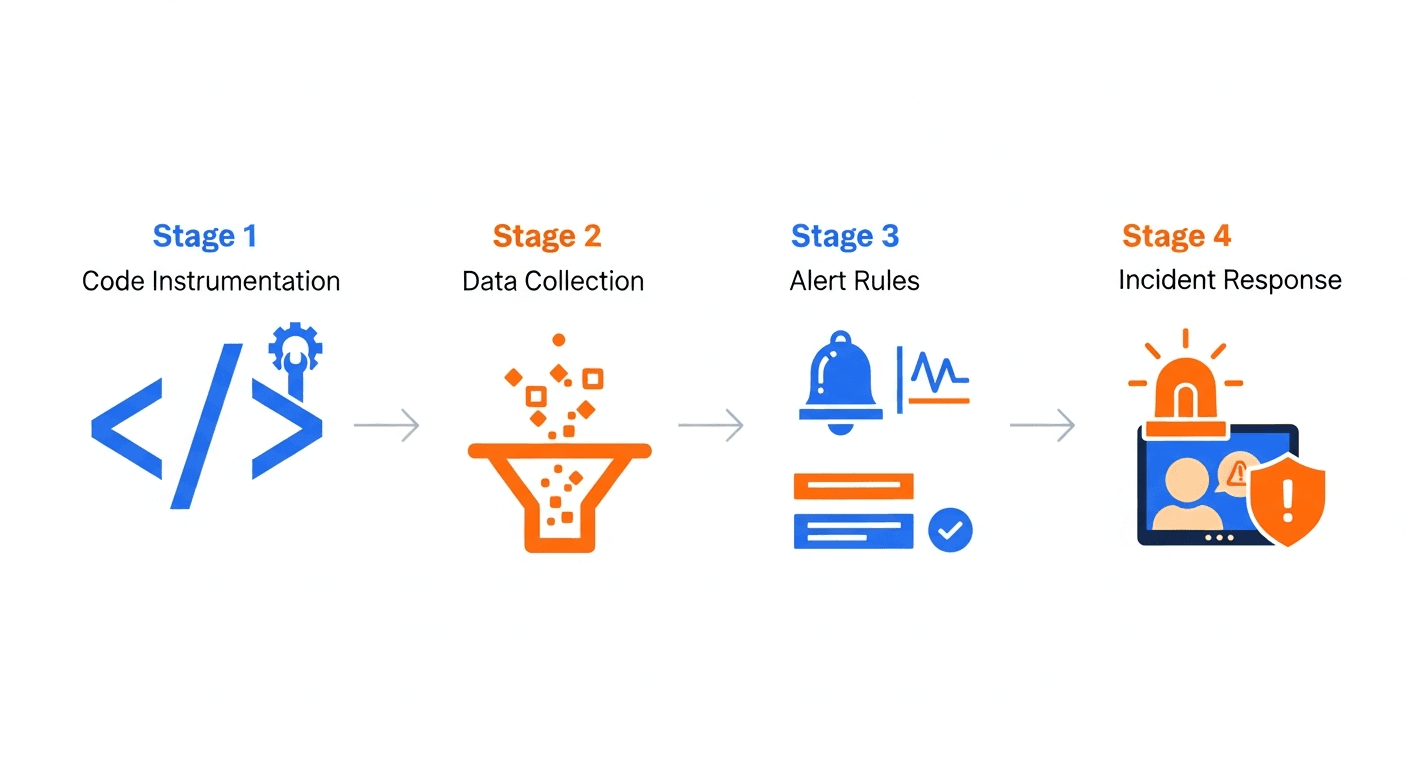
The Complete SecureNow Workflow: From First Trace to Incident Resolution
Security monitoring platforms often promise end-to-end visibility and deliver a collection of disconnected features that require months of integration work. The gap between "we installed the tool" and "we stopped an actual attack" is where most platforms lose their teams—and where attackers find their window.
SecureNow was built around a single principle: the entire journey from instrumenting your application to resolving a security incident should be one continuous workflow, not a patchwork of tools stitched together with scripts and spreadsheets. Every feature feeds into the next. Traces power alert rules. Alert rules generate notifications. Notifications trigger investigations. Investigations produce evidence for forensics. Forensics inform better rules. The loop closes, and each cycle makes your security posture stronger.
This guide walks through that entire workflow—ten stages from application setup to resolution—so you understand not just what each feature does, but how they work together as a unified security operations platform.
Stage 1: Application Setup
Every SecureNow workflow begins with registering your application. When you create an application in the platform, SecureNow generates a UUID v4 API key that uniquely identifies your app. You configure the application with its host information and bind it to a ClickHouse instance—either a shared instance for getting started quickly or a dedicated instance for production workloads that require isolation.
The setup screen captures the essentials: application name, environment (production, staging, development), associated hosts, and the ClickHouse connection. SecureNow supports multi-instance ClickHouse deployments with encrypted credentials and a built-in test connection feature, so you can verify connectivity before sending a single trace.
Once your application is registered, you instrument your services with OpenTelemetry. If your application is already generating traces for observability purposes, the integration is straightforward—you configure an additional exporter pointing to your SecureNow-bound ClickHouse instance. OpenTelemetry's vendor-neutral design means no proprietary SDKs and no lock-in. The traces arrive in SecureNow-compatible format, which SecureNow's analysis engine is built to consume natively.
The protection status indicator on your application dashboard turns active once traces begin flowing. From this point forward, every request to your application—every API call, database query, outbound connection, and authentication attempt—is captured and available for security analysis.
Stage 2: Trace Monitoring
With traces flowing, SecureNow's trace explorer becomes your primary observation point. The explorer presents your application's traffic as structured, searchable trace data with three complementary views: tree view for hierarchical span relationships, Gantt view for timing analysis, and timeline view for chronological sequencing.
Each trace represents a complete request lifecycle. A single API call might produce dozens of spans covering the HTTP handler, authentication middleware, authorization checks, database queries, cache operations, and outbound service calls. This is the level of detail that log-based security tools cannot provide—you see not just that a request happened, but everything the application did in response.
The protection status dashboard gives you an at-a-glance view of your application's security posture: total traces processed, anomalies detected, and active investigations. For deeper analysis, you can trigger AI-powered trace analysis on any individual trace. The AI examines every span in the trace, evaluating input propagation, query construction, outbound request patterns, authentication flow integrity, and timing anomalies. It produces a structured security report identifying specific vulnerabilities with severity classifications and remediation guidance.
This is the foundation everything else builds on. Without rich, structured trace data, alert rules have nothing to query, AI investigation has nothing to analyze, and forensics has no dataset to explore.
Stage 3: Alert Configuration
Passive monitoring catches threats you happen to look at. Active alerting catches threats while you sleep. SecureNow's alert rules bridge the gap between trace data and actionable notifications through SQL-based queries that run on a configurable cron schedule.
Each alert rule is a SQL query executed directly against your ClickHouse trace data. This means you have the full expressiveness of SQL to define detection logic—no proprietary query language, no limited filter dropdowns, no artificial constraints. If you can write a SQL query that identifies suspicious behavior, you can turn it into an alert rule.
A basic authentication anomaly rule might query for IPs generating more than 20 failed login attempts in a 5-minute window. A more sophisticated rule might calculate the ratio of 4xx to 2xx responses per endpoint per IP, flagging those with abnormally high error rates. The NIST Cybersecurity Framework emphasizes the importance of continuous monitoring (DE.CM), and SQL-based alert rules make that practical at the application layer.
Rules run on a configurable cron schedule, defaulting to every 15 minutes. High-priority rules can run more frequently; low-priority rules can run hourly. Each rule supports throttling to prevent alert storms—if a rule fires repeatedly for the same condition, throttling ensures your team receives one actionable notification rather than a flood. You can also configure per-rule exclusions to filter out known false positive patterns without disabling the rule entirely.
For a deeper dive into building effective alert rules, see our alert rule construction guide.
Stage 4: Notification Triage
When an alert rule fires, SecureNow generates a notification and delivers it through your configured channels: email via Resend, Slack via webhooks, or in-app notifications in the SecureNow dashboard. Most teams configure all three for high-severity rules and in-app only for informational ones.
The notification triage interface is where SOC analysts spend most of their time during active incidents. Notifications arrive with severity levels and are organized by status in a workflow that mirrors established incident response practices: open → acknowledged → investigating → resolved or dismissed.
IP grouping is a critical noise reduction feature. When an alert rule detects 50 IPs engaged in the same attack pattern, SecureNow groups them into a single notification rather than generating 50 separate alerts. The grouped view shows all relevant IPs with their metadata, reputation data, and activity summary. Analysts can triage the group as a unit rather than handling each IP individually.
Each notification includes a timeline that records every action taken: status changes, comments from team members, investigation triggers, and resolution notes. This audit trail is invaluable for post-incident review and compliance documentation. For a detailed guide to notification workflows, see our SOC notification triage guide.
Stage 5: IP Investigation
Once a notification identifies suspicious IPs, SecureNow's AI investigation system takes the analysis deeper. You can trigger AI investigation on individual IPs or batch-investigate multiple IPs simultaneously from the notification view.
The AI investigation engine pulls the IP's complete trace history, correlates it with external intelligence from SecureNow AI IPDB, analyzes behavioral patterns, and generates a structured verdict. Each investigation report includes a risk score, certainty level, identified attack patterns, recommended code fixes, and specific mitigation steps.
The SecureNow AI IPDB integration provides 14-day cached reputation data with automatic enrichment. When an IP appears in a notification, SecureNow has already fetched its abuse history, geographic location, ASN, ISP, and detection flags for Tor exit nodes, proxies, and VPN endpoints. Rate limiting ensures you stay within SecureNow AI IPDB's API quotas even during large-scale incidents.
IP monitoring tracks each address through its own status lifecycle: open → investigating → suspicious / malicious / clean / blocked / false_positive. The geo/ASN/ISP metadata enrichment provides context that raw IP addresses alone cannot—a burst of traffic from a hosting provider ASN in a country where you have no customers tells a very different story than the same traffic from a residential ISP in your primary market.
Investigation results are cached for 7 days, so subsequent queries for the same IP return instantly. An investigation queue manages concurrent analyses, ensuring the system remains responsive even when processing dozens of IPs simultaneously. For more on AI investigation capabilities, see our AI threat investigation guide.
Stage 6: Forensic Analysis
Some investigations require going beyond pre-built alert rules and AI-generated reports. When you need to ask a question that no existing rule covers—"show me all requests to admin endpoints from IPs that appeared for the first time in the last 48 hours"—SecureNow's forensics engine answers it.
The forensics feature translates natural language questions into ClickHouse SQL queries. You type your question in plain English, and the NL-to-SQL engine generates the corresponding query against your trace schema. The system performs schema introspection to understand your data structure and produces accurate queries without requiring you to memorize table names or column formats.
This is a powerful equalizer. Junior analysts who don't know SQL can investigate as effectively as senior engineers. SOC teams can explore hypotheses in real time during active incidents without waiting for someone to write a query. Developers can audit their own endpoints without learning ClickHouse syntax.
Queries can be saved to a library for reuse and shared across the team. Common forensic queries—"show all 5xx errors by endpoint in the last 24 hours," "find IPs accessing both authentication and payment endpoints," "identify requests with unusually large response bodies"—become one-click operations that any team member can execute.
For a complete guide to forensic analysis, see our forensics guide.
Stage 7: False Positive Management
Every detection system generates false positives. The difference between a useful platform and an abandoned one is how well it handles them. SecureNow provides layered false positive management that reduces noise without creating blind spots.
Exclusions operate at two levels: global exclusions that apply across all alert rules, and per-rule exclusions that suppress specific patterns for individual rules only. This granularity matters—you might want to exclude your uptime monitoring service from authentication failure rules without excluding it from data exfiltration rules.
The AI-suggested exclusion feature analyzes dismissed notifications and recommends exclusion patterns based on recurring false positive signatures. Before applying any exclusion, you can test it against historical data to verify it would suppress the intended false positives without masking genuine threats. This test-before-apply approach prevents the common mistake of creating an exclusion that accidentally blinds you to real attacks.
Cross-notification application lets you apply an exclusion discovered during one investigation to all related notifications retroactively. If you determine that a specific IP is your load balancer's health check and dismiss the notification, the exclusion can propagate to past and future notifications matching that pattern.
For a comprehensive guide to managing false positives effectively, see our false positive reduction guide.
Stage 8: API Map Discovery
Understanding what you're protecting is as important as detecting attacks against it. SecureNow's API Map Discovery feature builds a visual topology of your application's API surface by analyzing the trace data already flowing through the platform.
The discovery engine uses AI to identify endpoints, map dependencies between services, and catalog parameter patterns. The result is a circle-pack topology visualization that shows your entire API surface—every endpoint, every service-to-service dependency, and every parameter pattern—derived from actual production traffic rather than static documentation.
Dependency graphs reveal how services interact, which endpoints are entry points for external traffic, and which internal services could be reached through request chains. This visibility is critical for understanding your attack surface: an endpoint that directly queries a database with user input and also calls an internal service with that data represents a different risk profile than an endpoint that only reads from a cache.
The OWASP API Security Top 10 identifies improper inventory management as a key risk. API Map Discovery addresses this directly by maintaining a continuously updated view of your real API surface, including shadow endpoints and undocumented routes that appear in traces but not in your API specifications.
Stage 9: Quadrant Analysis
SecureNow's Quadrant Analysis provides a scatter plot visualization of IP traffic behavior, plotting each IP by its success rate versus error rate. This visual approach makes traffic patterns immediately legible in a way that tables of numbers cannot match.
The quadrant layout creates four natural categories. IPs in the high-success, low-error quadrant are your normal users. IPs in the low-success, high-error quadrant are likely attackers or misconfigured clients. The mixed quadrants reveal more nuanced situations: a legitimate user experiencing intermittent errors, or an attacker who has partially valid credentials.
During an active attack, the quadrant view instantly highlights clusters of IPs exhibiting similar behavior. A credential stuffing campaign appears as a tight cluster in the high-error quadrant. A distributed bot attack shows as a scattered cloud of IPs all trending toward abnormal error rates. This visual signal complements the structured analysis from alert rules and AI investigation.
For a detailed guide on interpreting quadrant analysis, see our IP traffic behavior analysis guide.
Stage 10: Resolution
The final stage of the workflow closes the loop. When an incident is fully investigated and contained, the SOC analyst marks the notification as resolved and adds resolution notes documenting the findings, actions taken, and lessons learned.
Resolution is not the end—it is the beginning of improvement. Every resolved incident should produce at least one of the following: a new or refined alert rule that would detect the same pattern faster next time, an exclusion that prevents a recurring false positive from wasting analyst time, or an API hardening recommendation that developers can implement to eliminate the vulnerability entirely.
SecureNow's notification timeline provides the complete audit trail from initial alert to resolution, including every status change, investigation report, forensic query, and team comment. This documentation satisfies compliance requirements for frameworks like SOC 2, HIPAA, and PCI DSS that mandate documented incident response procedures.
The resolved incident feeds back into the system. Alert rules get tuned based on what the investigation revealed. Exclusions get created or refined. AI investigation results are cached, making future analysis of the same threat actors faster. The API map updates as new endpoints are discovered. The quadrant analysis incorporates the behavioral data from the incident, sharpening its baseline.
The Workflow in Practice
What makes this workflow powerful is not any individual feature—it is the fact that each stage produces data and context that the next stage consumes. Traces feed rules. Rules produce notifications. Notifications drive investigations. Investigations generate forensic questions. Forensics reveal exclusion patterns. Exclusions refine rules. The system gets smarter with every incident.
A typical workflow during an active incident looks like this: an alert fires at 2:47 AM detecting authentication anomalies. The on-call analyst acknowledges the notification, reviews the grouped IPs, triggers AI investigation on the most active offenders, corroborates with SecureNow AI IPDB data, runs a forensic query to identify the full scope of the attack, excludes the monitoring service that triggered a false positive, marks the malicious IPs for blocking, and resolves the notification—all within a single platform, with a complete audit trail, in under 15 minutes.
That is the difference between a collection of security features and a security operations workflow.
Getting Started
The modular design means you do not need to deploy every feature on day one. Most teams start with application registration and OpenTelemetry instrumentation in the first week, add alert rules and notification channels in the second week, and begin practicing investigation workflows and forensic queries in weeks three and four. By the end of the first month, you have a fully operational security monitoring workflow that continuously improves with every alert, every investigation, and every resolved incident.
Frequently Asked Questions
How long does it take to get SecureNow fully operational?
Most teams have traces flowing within 15 minutes, basic alert rules in an hour, and full investigation workflows operational within a day. SecureNow is designed for rapid time-to-value.
Do I need to use all SecureNow features?
No. SecureNow is modular—you can start with trace monitoring and add alert rules, AI investigation, and forensics as your security maturity grows.
Can SecureNow work alongside our existing SIEM?
Yes. SecureNow complements SIEMs by providing application-level trace analysis that log-based SIEMs can't offer. Many teams use SecureNow for application security and their SIEM for infrastructure security.
What's the learning curve for SecureNow?
Developers can start with trace monitoring immediately. SOC analysts find the notification triage interface familiar. The forensics NL-to-SQL feature eliminates the need to learn ClickHouse SQL syntax.
Frequently Asked Questions
How long does it take to get SecureNow fully operational?
Most teams have traces flowing within 15 minutes, basic alert rules in an hour, and full investigation workflows operational within a day. SecureNow is designed for rapid time-to-value.
Do I need to use all SecureNow features?
No. SecureNow is modular — you can start with trace monitoring and add alert rules, AI investigation, and forensics as your security maturity grows.
Can SecureNow work alongside our existing SIEM?
Yes. SecureNow complements SIEMs by providing application-level trace analysis that log-based SIEMs can't offer. Many teams use SecureNow for application security and their SIEM for infrastructure security.
What's the learning curve for SecureNow?
Developers can start with trace monitoring immediately. SOC analysts find the notification triage interface familiar. The forensics NL-to-SQL feature eliminates the need to learn ClickHouse SQL syntax.
Recommended reading
Part 1 of the AI Security Auditing series. Set up an AI coding agent to audit your application's security locally — install SecureNow, connect your account, and run your first threat-model pass in minutes.
Jul 24A practical, end-to-end guide to auditing your application's security with an AI coding agent — find vulnerabilities at the code level, build detections at the runtime level, and never upload your codebase to do it.
Jul 24Part 2 of the AI Security Auditing series. Use an AI agent to audit your login, session, MFA, password-reset and magic-link flows for account-takeover paths — then catch the attempts in live traffic.
Jul 23